
Updated October 18, 2026. This guide is based on dashcam manuals, manufacturer support and electrical-test guidance, not a hands-on endurance test on a particular motorcycle. Confirm your camera firmware, wiring harness and battery requirements before installation.
Quick answer: motorcycle dashcam parking mode does use battery power when the engine is off. The safer setup combines a camera that genuinely supports parked surveillance, its manufacturer-approved power/ACC connections, and a documented low-voltage cutoff or suitably protected auxiliary power source. Choose impact-triggered low-power standby rather than continuous recording if preserving the starter battery is the priority. Don’t assume any camera or 12 V adapter will protect the battery automatically.
A parked motorcycle’s battery is much smaller than a typical car’s, and a weak starter battery can fail to crank well before its labeled amp-hour rating is exhausted. The aim is to capture useful footage from a knock or parking incident without sacrificing the next start. This page explains what parking mode actually means, how the INNOVV K7 works, why wiring matters and how to decide if your riding/storage pattern supports the feature.
Disclosure: HandlebarHQ may earn commissions from qualifying product purchases. Technical conclusions are based on manufacturer instructions and independent checks, not invented in-house testing. Read our affiliate disclosure and editorial policy.
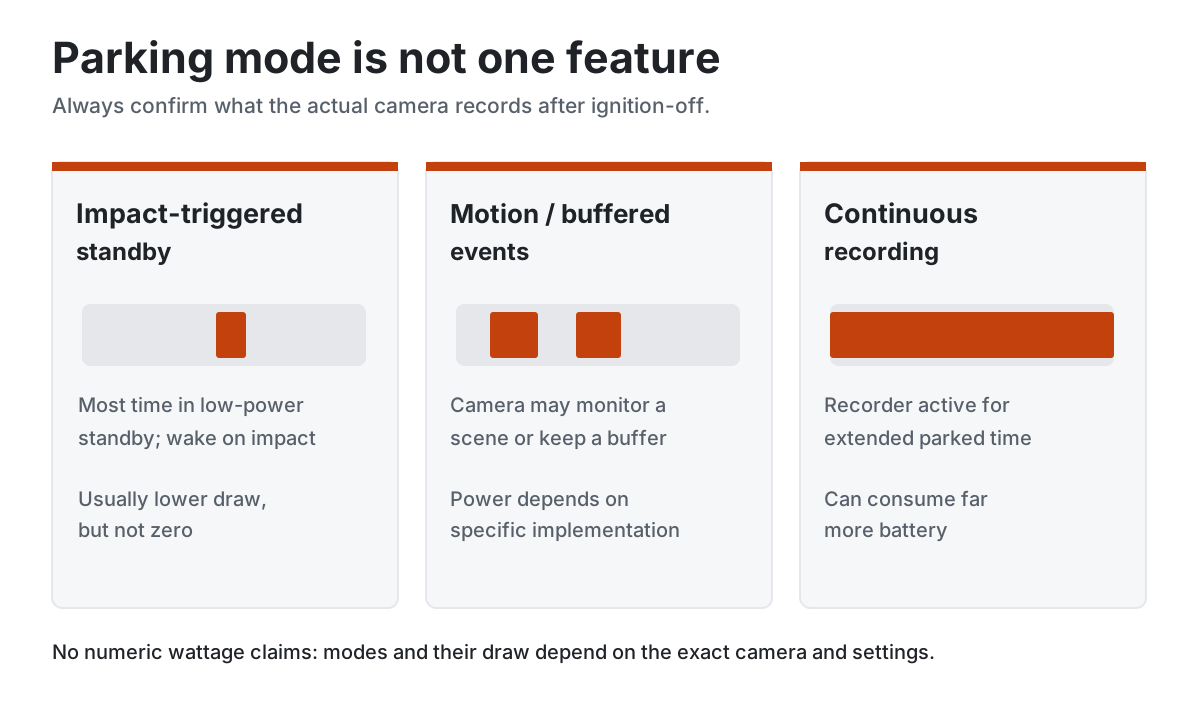
Parking mode isn't one feature: understand the three versions
| Parking behavior | What happens when parked | Battery trade-off |
|---|---|---|
| Impact-triggered standby | Motion/G-sensor electronics remain alert; a qualifying shock wakes or triggers recording | Usually lower draw than active video, but not zero |
| Motion detection or buffered event capture | Camera may need active sensors or a buffer to detect action before/after events | Varies widely by model; do not assume low draw |
| Continuous/low-bitrate/timelapse | Recorder remains active for extended periods | Potentially much higher draw; may be unsuitable for small motorcycle batteries |
These categories are not interchangeable. G-sensor impact surveillance is not necessarily 24-hour continuous video, and not every impact-triggered system promises pre-impact footage. Check exactly when the camera wakes, what footage is saved, how locked clips are protected from loop overwrite, and whether the manufacturer documents battery protection.
Which motorcycle dashcams actually support parking mode?
| Model | Verified parked behavior | Important qualification |
|---|---|---|
| INNOVV K7 | G-sensor triggered surveillance, enabled in the INNOVV app | Parking monitor is off by default; requires continuous battery supply and separate ACC sense, with at least 12.5 V stated in the manual |
| Vantrue F1 | Parking-mode behavior appears in official firmware history | Modes and shutdown have changed with firmware; use the F1 manual and installed firmware version for exact behavior |
| INNOVV K6 | No parking-monitor claim in our current comparison | Do not assume K7 features carry across to its lower-cost sibling |
| Thinkware M1 | Automatically powers off when ignition is turned off | Ordinary ride recording is not the same as parked surveillance |
Our Best Motorcycle Dash Cams guide compares the recording hardware; the INNOVV K7 review and K7 vs Vantrue F1 comparison give model-level context. Do not buy a camera only because a retailer uses the label “24H protection.” Read the actual supported mode and wiring requirements.
INNOVV K7 parking mode: what the manual actually requires
INNOVV explicitly says K7 parking monitoring is disabled by default. Enable it in the app, confirm the G-sensor sensitivity and verify that impact-triggered footage saves to the expected protected-video location. A card meeting INNOVV’s published U3/V30 standard is important for reliable recording.
The K7 support portal links to the installation guide and manual. The published K7 manual copy describes red to positive battery, black to negative, and yellow to switched ACC; the battery feed remains available for the parked monitoring electronics while the yellow wire tells the K7 whether ignition is on. The manual specifies the battery output must be at least 12.5 V for parking mode. This threshold is a manufacturer requirement for this model, not a general state-of-charge cutoff for every bike or lithium battery.
If you connect all the K7’s power leads to an accessory distribution system that turns completely off after ignition, the parking monitor may have no power to wake. Equally, connecting wires incorrectly to a managed CAN-bus circuit can trigger faults. Follow the exact K7 wiring diagram and have an experienced installer handle uncertain circuits. A relay or controller can be useful, but it must preserve the manufacturer’s distinct permanent-supply and ACC logic where required.
Does the Vantrue F1 behave the same way?
Vantrue’s official F1 firmware log records a 2024 update adding entry to parking mode after approximately five minutes stationary and a three-second delayed shutdown after ACC-off on certain bikes. A subsequent update addresses unexpected freezes during ignition-off transitions. That is useful evidence that F1 parking behavior depends on software state; it is not permission to assume the K7’s cable colors, voltage thresholds, trigger settings or current draw also apply to the F1.
Check the current F1 documentation, installed firmware and supported kit for your camera. If the exact low-voltage cutoff or surveillance power input is not documented, verify it with the manufacturer or a qualified installer rather than inferring it from a generic car dashcam kit.
Why a normal ignition-powered dashcam does not necessarily monitor parking
Many motorcycle recorders start when the key is turned and shut down at key-off. Thinkware’s official M1 product page explicitly describes this start-and-stop behavior. Separately, Thinkware’s general parking-mode power guidance explains that simply leaving an ordinary 12 V outlet powered is not sufficient to enable the company’s supported parking transition when the required ACC signal is absent. That general documentation applies to compatible Thinkware products; it does not imply M1 supports parked surveillance.
Before spending money on a hardwire kit, identify the exact camera model and compatible power harness. Some CarPlay screens with integrated dashcams also stop recording with ignition and should not be advertised as parking monitors unless their own manual explicitly confirms it. See our CarPlay screens with dashcams comparison for the broader system trade-offs.
How much battery would parking mode use?
Battery drain depends on the measured battery-side current in each operating state, not a guessed number from a camera’s video resolution or a USB rating. Some systems sleep and wake only for impacts; others draw substantially more while actively recording. We did not locate independently verified K7/F1 standby currents for the specific setups being discussed, so the examples below are illustrative scenarios, not measured model specifications.
For an approximately constant parked load: amp-hours used (Ah) = battery-side current (A) × parked hours. Example: 0.15 A for 12 hours uses 1.8 Ah. A camera can switch between low-power standby and active recording, so the true total is the sum of time spent in each state. Include alarms, trackers and other parasitic loads when assessing the bike’s battery.
Illustrative drain scenarios: 4, 12 and 24 hours
| Hypothetical input draw | 4 hours | 12 hours | 24 hours |
|---|---|---|---|
| 20 mA (0.02 A) | 0.08 Ah | 0.24 Ah | 0.48 Ah |
| 150 mA (0.15 A) | 0.60 Ah | 1.80 Ah | 3.60 Ah |
| 300 mA (0.30 A) | 1.20 Ah | 3.60 Ah | 7.20 Ah |
These values come from arithmetic alone. They must not be used as “days until a flat battery” forecasts. A starter battery needs a cranking reserve, and the advertised Ah rating is not fully usable for surveillance. Temperature, battery age, initial charge, BMS behavior, self-discharge and camera wake events change the result. If a calculated draw exceeds the battery’s available capacity, the assumption of a constant load for the whole period is no longer physically achievable.
The four safeguards that actually matter
1. Correct camera-specific wiring and fused protection
Install the manufacturer’s approved harness with the required permanent feed, switched ACC/ignition sensing and grounding arrangement. Protect the positive feed with the proper fuse and keep it near the supply as appropriate. Do not use the motorcycle’s ECU, ABS or unidentified CAN-bus cables as a convenient trigger. Incorrect wiring can either disable surveillance or leave a much larger load running continuously. Our USB charger installation guide explains general fuse and accessory-circuit principles, but the camera’s own schematic governs its parking feed.
2. A documented low-voltage cutoff
A cutoff is a safety guard, not a guarantee that the bike will start after any period parked. The K7 manual’s 12.5 V parking requirement is a device-specific reference. Battery terminal voltage depends on recent charging, load, temperature and chemistry, so don’t treat that number as a universal 50%-charged point or copy it into other models. If a controller offers configurable thresholds, choose a manufacturer-supported setting for the exact battery and verify operation, preferably with your motorcycle technician.
3. Impact-only standby rather than unnecessary continuous video
Where available, use a low-power triggered mode when the bike is parked for extended periods. Continuous recording, pre-buffering or excessive false triggers can raise consumption. Adjust G-sensor sensitivity using the camera’s app and confirm that normal vibrations from traffic do not fill the card with protected events. Too little sensitivity, however, can miss genuine knocks: test it carefully with the motorcycle stationary and engine off, without striking the bike or damaging bodywork.
4. Storage policy and battery maintenance
Commuters parked outside for a few hours have different needs from touring riders who leave a bike for two weeks. For long storage, consider turning parking surveillance off and using a maintenance charger rated for the actual lead-acid/AGM or LiFePO4 starter battery. A separate camera battery pack can protect the starter reserve if it is compatible with the camera and properly fused; never assume an automotive dashcam pack will fit, handle motorcycle weather or provide the expected voltage.
Wiring architecture: why ACC and battery feeds are different
Before choosing the power feed, read our Motorcycle CarPlay installation: ACC vs battery vs USB guide for manufacturer-specific CHIGEE, Carpuride and Aoocci requirements, safe fuse selection and key-off troubleshooting.
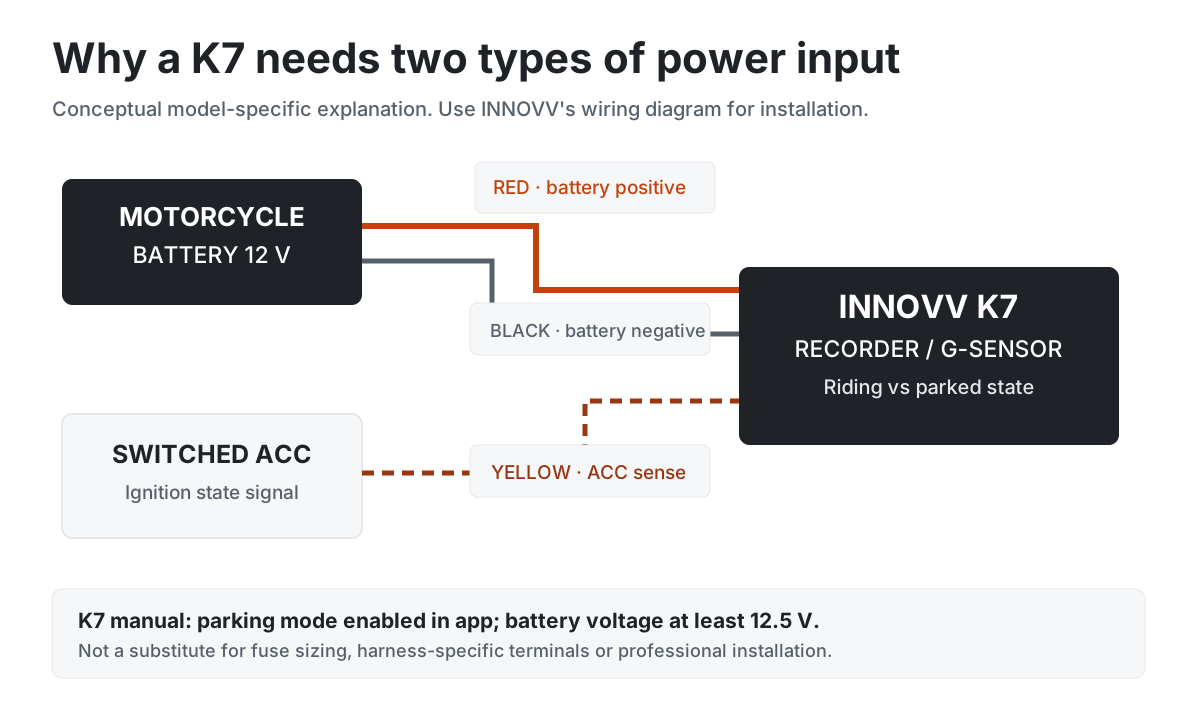
The conceptual diagram below distinguishes constant fused supply from switched ACC sense for cameras designed around that arrangement. It is not a pin-by-pin installation plan. If a particular model supports a different architecture, follow its own diagram. The camera must be able to enter low-power parking mode without mistaking ignition-off for a complete power failure.
How to test parking mode without risking your motorcycle battery
- Verify the model and firmware. Read the manufacturer’s manual and app setting. Confirm parking monitor is supported, not merely mentioned in a retailer title.
- Check the vehicle supply. Ensure permanent power and ACC sense behave as documented, including any delayed accessory shutdown. Do not choose a wire based solely on color.
- Use a charged, healthy battery. Test on a battery in known good condition; do not begin with a weak starter battery.
- Enable the intended mode. On the K7, parking monitor is disabled by default, so activate it and check G-sensor sensitivity.
- Check the transition at ignition-off. Wait for any designed delay and confirm the recorder enters the intended standby or parking state rather than continuing full recording.
- Verify a saved event safely. Use the manufacturer-recommended simulated event/test method; confirm a correctly time-stamped file is stored and protected.
- Measure total parked current if needed. Have a technician compare draw before/after the camera is connected, after modules finish sleeping, to identify its contribution.
- Confirm the shutoff and next start. Test according to manufacturer guidance without deliberately flattening the battery.
The current-test method deserves care. Fluke’s parasitic draw guidance uses a correctly ranged meter in series after the vehicle sleeps. Never place a current-mode multimeter directly across the battery, start the engine with it inline, or exceed the meter’s fused current rating. A suitable low-current DC clamp meter or professional diagnostic tool may reduce the need to break the circuit, but ordinary clamp meters often cannot resolve low milliamp loads.
Parking mode not recording? Troubleshoot in this order
| Symptom | Likely check | Action |
|---|---|---|
| Recording stops when key turns off | Is parking mode enabled? Is the correct permanent feed present? | Follow the exact camera manual; verify ACC sensing separately |
| Parking mode never starts | Battery voltage/cutoff, app setting, incompatible hardwire kit | Confirm device requirements and measured voltage under appropriate conditions |
| Battery weak next morning | Constant full recording, too many events or other aftermarket loads | Turn surveillance off until draw is diagnosed |
| Many locked empty clips | Over-sensitive G-sensor or normal vibration | Adjust settings and inspect mount placement |
| No usable evidence after impact | Card failure, overwritten footage or event happened before recording began | Check recordings, approved microSD requirements and supported event mode |
Parking mode and lithium motorcycle batteries
LiFePO4 starter batteries can have a different resting-voltage profile and sometimes a BMS with its own cutoff or restart procedure. A simple voltage-based parking controller may behave differently compared with lead-acid or AGM. Avoid generalizing car dashcam 12.0/12.2/12.4 V defaults to a lithium motorcycle battery. Prefer documentation specific to both the dashcam power module and battery, and verify actual cutoff behavior before leaving the bike unattended for days.
Does parking mode protect a motorcycle from theft?
Footage can help after an incident, but a dashcam is not a theft alarm or a substitute for a physical lock, secure parking or insurance. A camera may not record a thief who avoids a triggering impact, damages the recorder or removes the motorcycle before footage saves. Some parked modes capture events rather than continuous coverage. Set expectations accordingly.
Who should enable parking surveillance?
- Daily commuter, public parking: potentially useful if impact-triggered mode and cutoff are verified.
- Touring bike stopped overnight: useful with a healthy battery; keep the duration and other accessory loads in mind.
- Bike stored weeks in a garage: usually prioritize battery maintenance and disable unnecessary standby loads.
- Bike with lithium starter battery: verify cutoff compatibility instead of trusting a generic voltage threshold.
- Rider with an ignition-only camera: do not assume buying a universal hardwire kit will create parking mode.
Final verdict: protect both the recording and the next start
For a genuine motorcycle parking monitor, the INNOVV K7 is one of the clearer documented options: it offers impact-triggered surveillance, app-controlled activation and a specified ACC-plus-battery wiring arrangement. The catch is that parked surveillance still requires power. Enable the feature deliberately, respect the 12.5 V manual requirement and test the bike’s real parked behavior rather than relying on a vague “24H” headline.
If the bike stands idle for long stretches, it can be smarter to switch parking monitoring off or use compatible auxiliary power. For dashcam product choices, compare the best motorcycle dashcams and read the full K7 review. For underlying electrical draw, our USB charger battery-drain guide explains the same amp-hour fundamentals.
Frequently asked questions
Will parking mode drain my motorcycle battery overnight?
It can, especially if a recorder remains fully active, events happen frequently, the battery is weak or the bike has other parasitic loads. Low-power impact-triggered standby with verified cutoff reduces the risk but does not eliminate all drain.
Does the INNOVV K7 record continuously for 24 hours when parked?
Its documented parking surveillance is G-sensor-triggered, not a blanket promise of continuous 24-hour video. The app setting must be enabled and proper permanent battery/ACC feeds provided.
Why is K7 parking mode not working with an ignition-switched power distribution box?
If the box removes power from the recorder’s permanent battery input when ignition turns off, K7’s parked surveillance may not have power to wake. Follow the manufacturer manual’s separate red/black battery and yellow ACC arrangements; do not improvise with unknown vehicle electronics.
What is the correct K7 low-voltage cutoff?
The published manual specifies battery output of at least 12.5 V for parking mode. That is a model-specific requirement and should not be generalized to all batteries or other recorders. Confirm the exact manual and firmware installed.
Will the Vantrue F1 parking mode work on every firmware version?
Vantrue’s official firmware history documents changes to parking entry and ignition-off handling. Verify the installed F1 firmware, camera settings and correct wiring kit; do not copy K7 wiring or voltage assumptions.
Can a CarPlay screen with a dashcam act as a parking security camera?
Only if that exact screen and its power arrangement explicitly support parked recording. Many start and stop recording with the key and have no verified parking-surveillance feature.
Sources and editorial method
Technical claims were checked against INNOVV’s K7 specifications, its K7 support portal and published K7 manual copy; Vantrue F1 firmware notes; Thinkware’s M1 specification; Thinkware’s general power and parking-mode explanation; and Fluke’s current-measurement safety guidance. All electrical-use tables are illustrative calculations, not measured current for a named camera.