
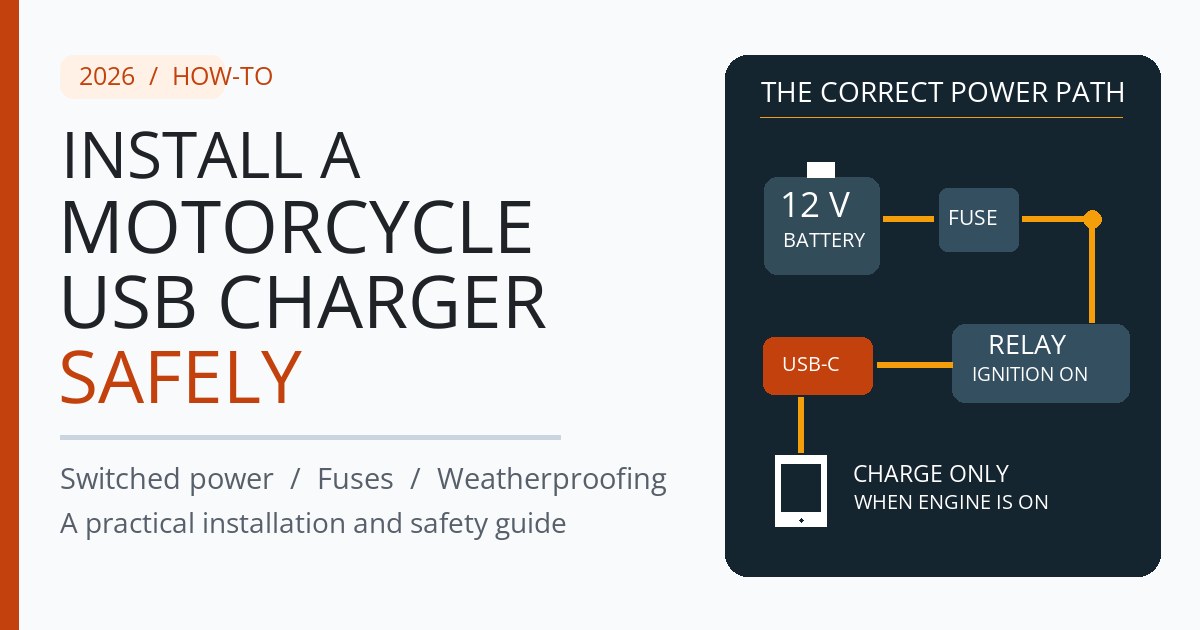
Updated October 18, 2026. This is a manufacturer-sourced installation guide, not a claim of hands-on electrical testing. Check the service manual and the specific charger instructions for your motorcycle.
Quick answer: Install a motorcycle USB charger on an approved ignition-switched accessory circuit, with the correct fuse, a motorcycle-rated 12 V-to-USB converter, weatherproof connections and enough cable slack for full steering lock. If no suitable OEM accessory connector exists, a dedicated fused battery feed controlled by an ignition-triggered relay is a common alternative. Do not tap unknown ECU, ABS or CAN-bus wiring.
The goal is a charger that works on long rides without leaving the bike flat after parking, interfering with controls or shorting in the rain. This guide covers planning, wiring methods, a step-by-step installation checklist and practical fault finding. For the broader charging choices, see How to Charge Your Phone on a Motorcycle.
Best power-source options: ACC vs battery vs relay
| Power source | Ignition off | Recommendation |
|---|---|---|
| Approved OEM accessory plug | Usually off; verify actual behavior | First choice if the connector and fuse are rated for the charger |
| Fused battery feed via relay | Off when ignition trigger deactivates | Good hardwired option if no suitable OEM socket exists |
| Fused direct battery / SAE | Typically still live | Only if unplugged after use or the charger has documented battery-protection cutoff |
| Unknown wiring tap | Unpredictable | Avoid |
A standard motorcycle battery does not output USB-compatible power. Your accessory needs a correctly rated DC-to-USB regulator. A USB-C PD port may supply more than 5 V to a compatible device after negotiation; never confuse its regulated USB output with raw battery voltage.
What you need before starting
- A motorcycle-rated waterproof USB-A or USB-C socket with its published 12 V/24 V input limits and device output rating.
- OEM plug-in accessory adapter, or correctly rated positive fused wiring, relay/controller and insulated terminals.
- Wiring diagram for the exact bike, hand tools, multimeter, loom protection, cable ties and suitable bracket.
- Appropriate fuse specified by the charger maker and compatible with the cable and circuit rating.
- Water-resistant charging cable and a cap or sheltered port position.
How to install a motorcycle USB charger: step by step
1. Find a documented accessory connector
Start by checking the owner manual and the OEM accessory list. Some bikes have an existing USB outlet, 12 V socket or a switched auxiliary plug under the seat or near the headlight. Use a matching adapter rather than cutting into the original loom. Verify the connector’s allowable current and whether it stays live for a few seconds after key-off; modern bikes can have delayed accessory shutdown.
2. Verify the chosen circuit using a multimeter
Check voltage with the ignition off and on, and wait for any model-specific delay before assuming a supply is always live. Never choose a wire by color or proximity alone. If an appropriate ACC circuit cannot be positively identified in documentation, stop and use a qualified motorcycle electrician. Avoid probing or modifying safety-critical controls, ECU circuits, vehicle data lines or unknown factory wiring.
3. Isolate power according to the service manual
Before altering connections, park securely, switch off the bike and follow its manual for battery isolation. On ordinary negative-ground 12 V systems, disconnect and reconnect in the sequence specified by the manufacturer so a tool cannot short the positive terminal to the frame. Modern electronic systems may require a special procedure. Do not improvise on an unfamiliar smart electrical system.
4. Add the correct fuse to the positive supply
For a battery-supplied installation, place the appropriate fuse on the positive feed as close to the battery as practical, before the long cable run. The fuse must protect the wiring as well as the charger. Follow the manufacturer’s fuse recommendation and the lowest applicable circuit/wire rating. A 3 A inline fuse is specified for Quad Lock’s particular hardwired waterproof wireless charging head; that is not a universal fuse value for other USB products. Never oversize the fuse just to stop it blowing.
5. Mount the outlet away from steering and heat
Position the socket where the rider can reach it without obstructing the instruments, handlebars or levers. Route the wires near protected factory harness paths where possible. Leave a modest service loop for full left and right steering lock without letting the cable snag the fork, pinch under the tank or touch the cylinder, exhaust or sharp frame edges. Secure the wiring against vibration without crushing insulation.
6. Protect connectors against weather
Use suitably sealed connectors and proper strain relief. A charger marked IP66 or IP67 may only be protected under specified conditions; the exposed USB cable at the phone is a separate moisture risk. Quad Lock’s motorcycle USB instructions recommend positioning the USB port facing downward to let dirt and water drain. Keep the protective cap in place when unused.
7. Test it before reassembling the bike
- With ignition off, confirm a switched outlet is actually off after any delayed shutdown.
- With ignition on, verify USB charging starts without a fuse or fault warning.
- Run the engine and confirm charging remains stable.
- Turn bars lock to lock and watch every cable and control for tension or interference.
- Switch off and wait; confirm the charging output behaves as designed.
- After a brief ride, reinspect terminals, cable ties, abnormal warmth and wear points.
Wiring diagram: an ignition-switched USB outlet
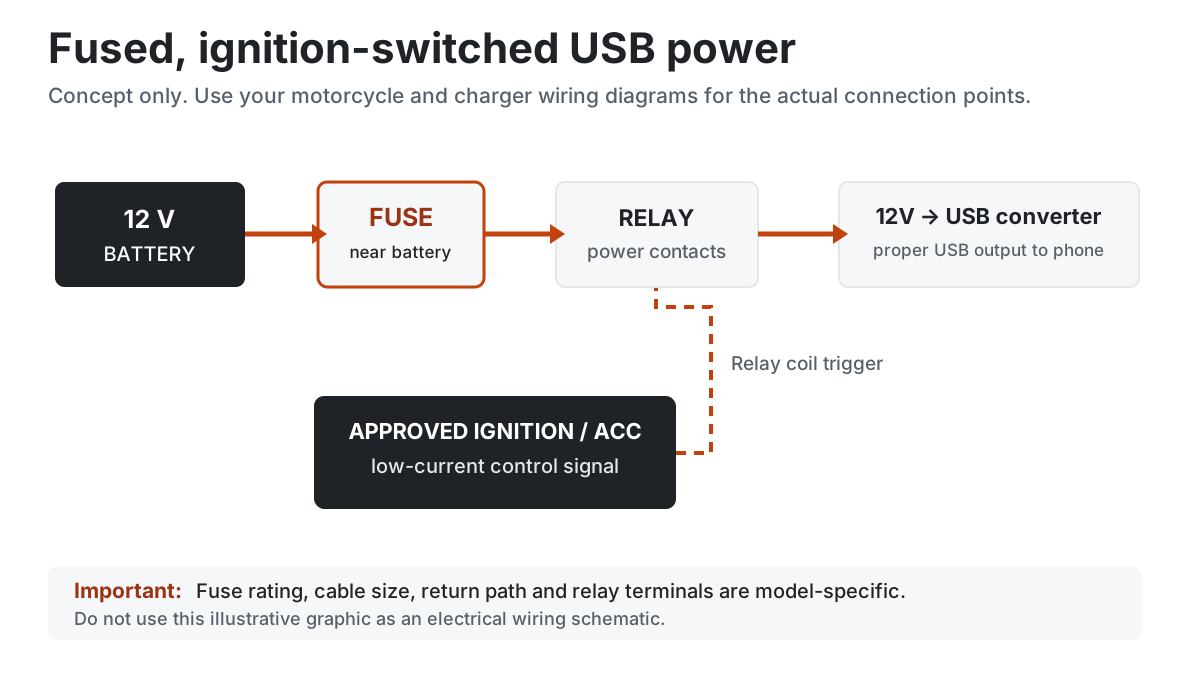
The schematic below is conceptual, not a motorcycle-specific wiring diagram. In a relay arrangement the battery supplies the main charger load through the positive fuse and relay contacts; an approved ignition-switched accessory feed only controls the relay coil. A relay does not replace the fuse. If your bike has an OEM accessory connector rated for the charger, use that documented connection instead.
Will a USB charger drain the motorcycle battery?
For the parked-power side of this installation, read our motorcycle USB charger battery-drain guide, including measured-current methods, illustrated amp-hour calculations and lithium AUTO-mode caveats.
A battery-direct outlet may draw standby current even with no phone connected. The draw depends on the converter, indicator light and control electronics. A hardwired wireless unit can remain active when parked: Quad Lock explicitly warns its hardwired waterproof head needs an ignition-positive feed or isolator to prevent drain. That advice does not apply to every model in the same way.
Some purpose-built battery-connected adapters have low-voltage protection. OptiMate, for example, documents USB power cutoff when a bike has been parked and when the battery falls below a stated threshold. Use the exact product instructions and check compatibility with your battery type. If the kit has no reliable automatic cutoff, prefer switched power or disconnect the adapter for storage.
How much power should the charger supply?
Choosing a charging outlet? Compare our best motorcycle USB-C chargers, including the difference between genuine 20 W Power Delivery and fixed 5 V USB-C.
Before choosing the power feed, read our Motorcycle CarPlay installation: ACC vs battery vs USB guide for manufacturer-specific CHIGEE, Carpuride and Aoocci requirements, safe fuse selection and key-off troubleshooting.
For a navigation phone, choose a regulator that matches the phone’s charging standard and its cable. USB-A ports may charge slowly when maps, music and the screen are active; USB-C Power Delivery offers more headroom for compatible devices. Published 20 W or 30 W ratings are maxima, not guaranteed real-world intake: phone temperature, cable quality and USB negotiation can limit output. The motorcycle accessory circuit must support the charger’s input load, not just the number on the USB output label.
Wireless mounting is convenient but introduces additional heat and compatibility considerations. Mount the phone securely, consider vibration isolation where the manufacturer recommends it, and avoid exposing the device to excessive sun. Our Best Motorcycle Phone Mounts guide covers those trade-offs.
Is a waterproof USB charger safe in the rain?
Read the product’s rating closely: the sealed body may resist spray while a plugged-in charging connector is still vulnerable. Keep both ends of the cable protected. If a phone reports moisture in the charging connector, stop wired charging until dry. Apple’s liquid-detection guidance explains that charging through a wet connector can cause corrosion and permanent damage. Never assume a rubber outlet cap protects an exposed phone-side USB plug.
Common installation problems
- Outlet stays on with key out: verify that you have a switched feed rather than permanent battery positive; allow any normal timed shutdown.
- Fuse keeps blowing: inspect polarity, short circuits, damage and current ratings. Never fit a larger fuse as a workaround.
- Charging cuts out at full steering lock: the harness is strained or pinched; fix it before riding.
- Phone charges too slowly: confirm charger output, cable condition and thermal throttling.
- New warning lights after installation: stop, restore the original wiring, and get model-specific technical help.
- USB socket corrosion: inspect the cap, drip orientation, cable seals and location.
Should a motorcycle CarPlay display share the USB feed?
Only if the source is rated for the combined input and each device’s manufacturer permits that topology. Some screens require a distinct ACC signal, constant supply or hardwired harness; don’t assume a generic USB socket can power the screen properly. See the Motorcycle CarPlay Screens guide for product-side requirements and CarPlay with Dashcam for integrated camera options.
Final pre-ride safety checklist
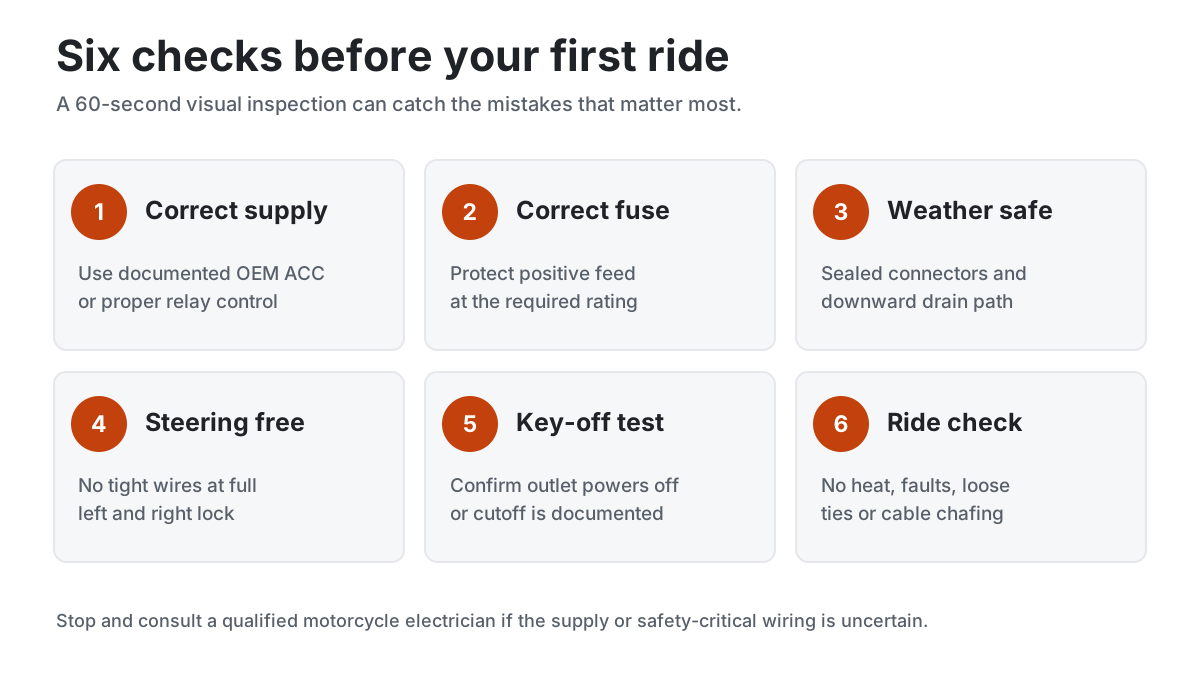
- Approved, documented supply and load limits confirmed
- Positive feed correctly fused and terminals insulated
- No wires near hot, sharp or moving parts
- Both steering locks verified with engine off
- Ignition-off behavior and any low-voltage cutoff tested
- Weather sealing, drip routing and protective cap checked
- No hot connection, blown fuse or ECU warning
Frequently asked questions
Can you connect a motorcycle USB charger straight to the battery?
Only when the charger is designed for direct battery input and the supply has appropriate protection. It may remain energized when parked. Choose switched power, a documented automatic cutoff, or deliberate disconnection when stored.
What fuse does a motorcycle USB charger need?
Use the specific charger installation instructions, wiring capacity and OEM circuit limits. There is no universally correct fuse for every USB charger. Quad Lock’s 3 A example applies to its designated hardwired wireless charging head.
Does the charger need a relay?
Not when a manufacturer-approved switched accessory outlet is already rated for the load. A relay or controlled power module is useful when the main current comes from a separately fused battery feed while a low-current ignition signal controls power.
Can you ride with a USB cable plugged in during rain?
Only if the actual charger-and-cable arrangement is rated and designed for use while plugged in and both ends remain protected. If a phone connector is wet, don’t continue wired charging.
When should a professional install the USB socket?
If you lack the bike’s wiring diagram, cannot identify an approved supply, need to splice managed electronics, or are unsure about fuse and conductor ratings, a qualified motorcycle technician is the better option.
Sources and editorial method
This guide is based on RevZilla’s charging overview, its fuse and switched-power advice, the relay demonstration, Quad Lock hardwire requirements, Quad Lock USB installation instructions, OptiMate battery monitoring and Apple’s moisture guidance. We do not claim to have fitted or tested a charger on a specific motorcycle.
Editorial/affiliate disclosure: HandlebarHQ may earn from qualifying purchases on some product guides, but this page uses manufacturer and technical-source references. See our affiliate disclosure and editorial policy.