
Updated October 18, 2026. This is a documentation-based motorcycle electronics guide. Installations vary by screen, battery chemistry, motorcycle and optional cameras. We have not bench-tested the wiring or modified a motorcycle for this article.
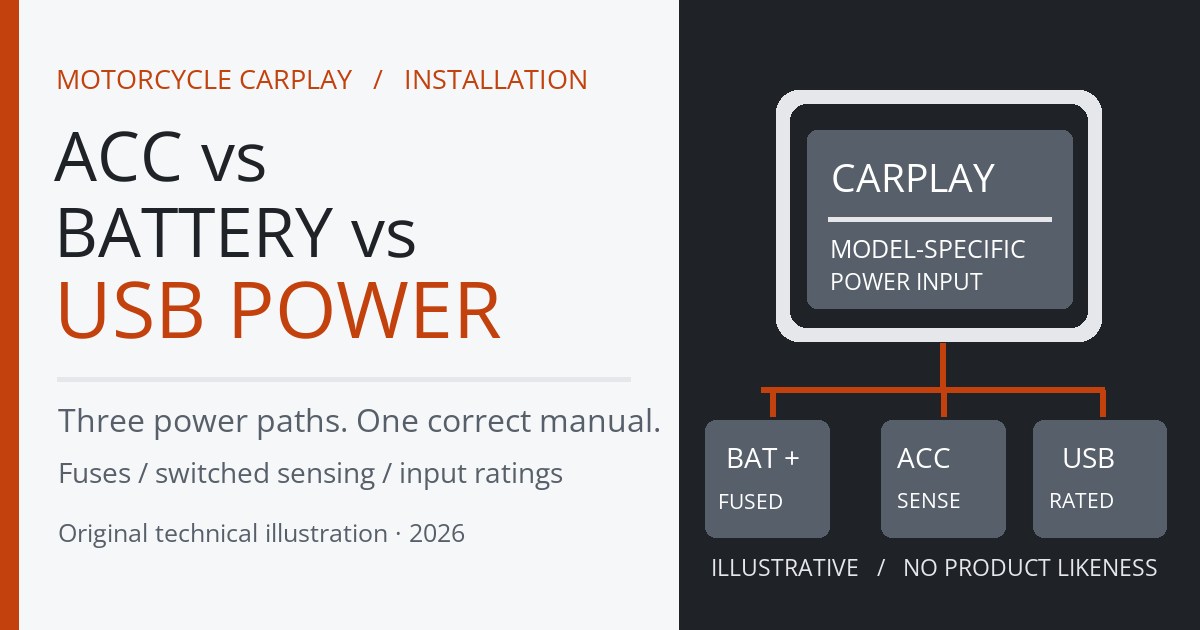
Quick answer: use the power arrangement specified by your exact motorcycle CarPlay display. A CHIGEE AIO-5 Lite-style hardwire harness uses fused battery positive, ground and a separate ignition-switched ACC signal. A Carpuride W712D can also be powered by an adequately rated USB source using its own included USB power cable. Simply joining every wire to the battery, or assuming a USB port can power any screen, can cause unreliable booting, lost parking functions or excessive parked battery draw.
The practical decision is between a clean, fused permanent installation and a removable USB-powered screen. CarPlay is normally a wireless phone connection on these units: the screen’s power cable powers the display; it does not turn the bike into an Apple CarPlay data port. Below is a safe way to choose, mount, test and troubleshoot without confusing battery power, ACC sensing and regulated USB output.
Affiliate disclosure: HandlebarHQ may earn from qualifying purchases on some linked buying guides. This article relies on manufacturer instructions and does not claim hands-on testing. See our affiliate disclosure and editorial policy.
ACC vs direct battery vs USB: which is right?
| Power method | How it works | Best for | Important limitation |
|---|---|---|---|
| Battery + ACC sense | Permanent fused B+ powers unit; ACC tells it ignition state | CHIGEE-style three-wire displays with cameras/parking features | Wrong ACC can leave unit awake or disable automatic sleep |
| Switched accessory supply | Display loses input power after key-off | Units expressly designed for a two-wire switched feed | May disable parking monitoring or remote wake on three-wire systems |
| USB power using maker’s cable | 5 V USB input, sometimes converted inside the cable | Compatible removable screens and temporary setups | USB port must provide enough current; not all cables/screens are interchangeable |
| Always-live battery without proper ACC control | Unit or converter may stay awake parked | Not a default recommendation | Possible battery drain, unexpected reboot/wake and feature problems |
The distinctions are fundamental. ACC is not a second full-power battery feed when the manufacturer’s three-wire architecture treats it as a signal. Conversely, some two-wire accessories are intended to draw their working current from a switched circuit. Follow the manual for the device in your hands, not a wiring color legend copied from another brand.
What CHIGEE actually recommends for AIO-5 and AIO-6
CHIGEE’s official wiring and power guide identifies three leads on its applicable hardwire harness: red = battery positive, black = battery negative/ground, and yellow = switched +12 V ACC. The company calls for an inline fuse near the red battery-positive connection, specifies 2–3 A in that guide, and says the yellow ACC line should measure about 12 V with the ignition on and zero with it off. Use your model’s supplied fuse/harness instructions where they differ.
The red/black pair provides power, while the yellow lead communicates whether the engine/ignition is active. If yellow is connected to constant positive, the display may not sleep when parked; if yellow lacks a true switched signal, camera/parking/remote-wake behavior can fail. CHIGEE’s AIO-5/AIO-6 installation guide reiterates battery-plus-ACC as its normal layout. The AIO-5 Lite-specific guidance likewise describes the color-coded red/black/yellow harness.
**Do not generalize the same terminal mapping to every Chigee version, BMW docking accessory or third-party screen.** Some BMW Nav Prep editions receive power through an OEM dock rather than bare battery wires. The correct kit, mounting base and model-specific documentation control the installation. For buying context, read our CHIGEE AIO-5 Lite review.
What Carpuride W712D says about USB versus hardwire
Carpuride’s official W712D product and wiring information lists two available routes: a supplied power cable for motorcycle DC input and a supplied USB cable. The published specification lists 6.5–30 V DC for hardwired input and 5 V / 3 A minimum for USB input. One installation note on the same listing mentions 5 V / 2.5 A; because the page itself is inconsistent, we recommend sizing to the higher documented 3 A figure or obtaining confirmation for your hardware revision from Carpuride.
For a quick trial or a removable screen, the USB route can be convenient when the bike’s outlet can maintain the required regulated output, and the exact Carpuride cable is used. For a permanent, camera-equipped setup, use the manufacturer’s rated DC harness and installation guidance. The W712D’s dual-camera cables and handlebar controller must also be routed securely: a screen that powers on in the garage is not yet a completed installation.
Aoocci: why USB cables are not universal
Aoocci’s motorcycle support page describes red/black battery connections and a yellow ignition-switched ACC lead on its applicable step-down/ACC cable. Separately, its dedicated USB conversion accessory specifies at least 5 V / 2 A USB input, with a regulated 12 V / 1.5 A output. Cable connector colors and supported models vary; confirm the connector and compatibility before ordering.
Aoocci’s C9 model explicitly offers USB conversion or ACC hardwiring and includes both routes in its listed package. Those are model-specific claims: they are not evidence that an Aoocci C6 Pro, a CPMC X6 or every generic display has identical electrical requirements. Check the exact manual, adapter and available power for each unit.
Before installation: choose the supply and check the bike
- Identify the precise model and harness revision. Match manual diagrams, firmware-dependent features and the plug supplied in the box.
- Check the vehicle accessory circuit limit. A factory connector may be switched but rated only for a small load; use the owner’s/service manual.
- Confirm whether parking/anti-theft recording matters. Some three-wire devices need B+ after ignition-off to remain ready for events.
- Plan the USB input separately from the display input. A cable that converts 5 V USB to 12 V should not be replaced with a random unregulated adapter.
- Check battery condition and chemistry. Automatic shutdown thresholds may behave differently with LiFePO4 and AGM/lead-acid batteries.
How to install motorcycle CarPlay safely
1. Mock up the display and mount before routing wires
Hold the unit in the intended cockpit position with handlebars turned lock to lock. The screen must not cover warning lights or key instruments, obstruct the brake/clutch controls, catch the windscreen or collide with the tank bag. Verify bracket and bar diameter compatibility. Check that a removable mount or quick-release system locks positively before riding.
2. Map the cable route, including optional cameras
Route the power lead along protected harness paths with enough slack around the steering head for full left and right lock. Keep clear of exhausts, sharp edges, the fork, suspension travel, brake hoses and throttle action. Camera-equipped models also need front/rear lens cables and possibly a controller. Test the full run before final cable ties or panel reassembly; never crush cables under a seat.
3. Locate an approved ACC source using the service manual
For a three-wire CHIGEE-style setup, identify a documented switched circuit and verify its on/off behavior with an appropriate DC voltmeter. Some bikes retain power briefly after key-off; allow for a delayed shutdown or CAN-controlled accessory behavior. Do not select a wire because it is yellow, close to the battery or “probably” a tail-light feed. Avoid tapping ECU, ABS or other safety/data systems. An owner without wiring documentation should use a motorcycle electrician.
4. Follow the exact fuse and harness requirement
A fused positive feed should protect the downstream cable as near the source as the manufacturer specifies. CHIGEE calls for 2–3 A on its cited harness; this is not a universal fuse size for Carpuride, Aoocci or another brand. Using a larger fuse to stop nuisance blowing is unsafe. Isolate the battery/electrical system using the motorcycle service procedure before altering the harness. Follow manufacturer grounding and terminal instructions.
5. If using USB, verify available input power and the right conversion cable
Choosing a charging outlet? Compare our best motorcycle USB-C chargers, including the difference between genuine 20 W Power Delivery and fixed 5 V USB-C.
The rated current must be available at the screen while riding, not merely printed on a USB-port label. For example, at 5 V, a 2 A source provides up to 10 W and a 3 A source up to 15 W; these are input power ceilings before any conversion loss. A dual-camera unit or one using a voltage-boosting adapter can brown out if the cable or outlet cannot sustain its load. Never connect a 12 V screen input directly to a raw 5 V cable or vice versa unless the manufacturer’s matched electronics permit it.
6. Check key-on, engine-start and key-off behavior
- With the motorcycle securely parked, confirm the display starts normally with the ignition.
- Confirm wireless CarPlay/Android Auto pairs over the unit’s documented Bluetooth/Wi-Fi flow.
- Start the engine and watch for rebooting, blanking, flicker or camera-recording interruptions.
- Turn the handlebars fully both ways to confirm no tension or interference.
- Switch the ignition off and wait through any designed delay; confirm the unit sleeps or parks as the manual specifies.
- If parking monitor is provided, follow the manufacturer’s safe event-test method without attempting to discharge the starter battery.
- After a short ride, reinspect strain relief, connector seals and mounting stability.
Three electrical paths shown side by side
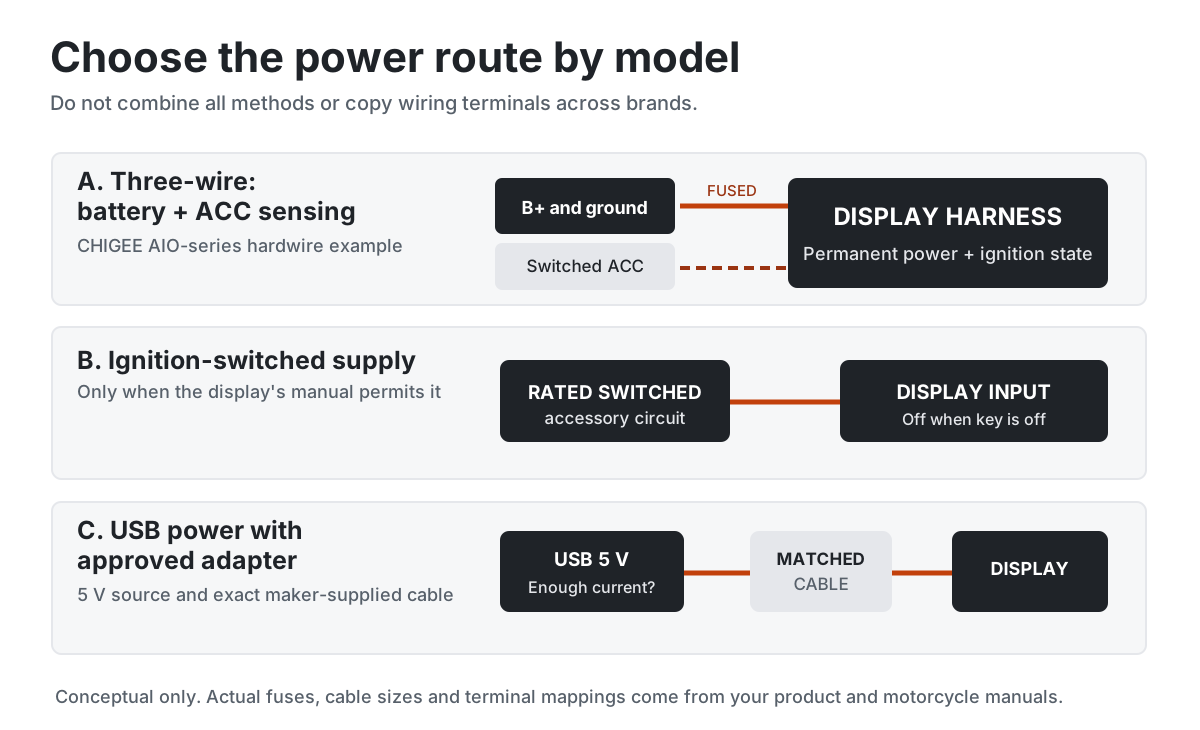
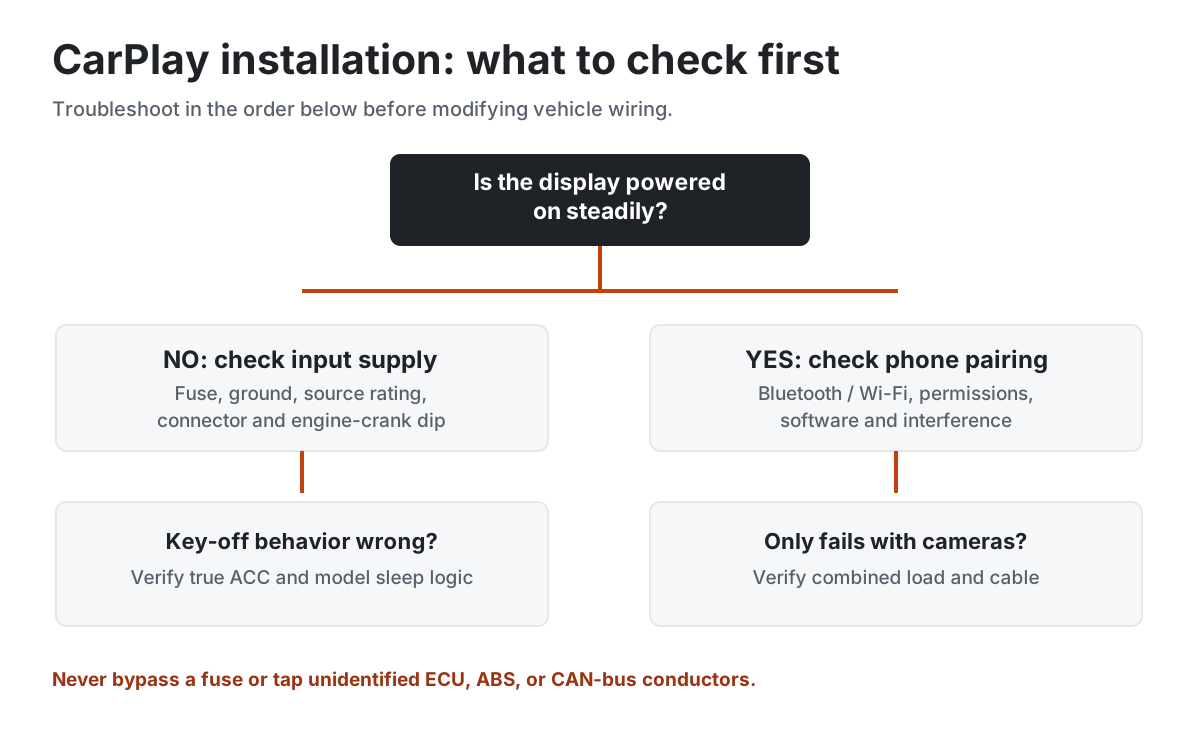
The power-options diagram below separates main fused battery power from low-current ACC sensing for a three-wire display, shows an approved switched-only option, and illustrates an input-rated USB adapter. The troubleshooting graphic below follows common fault symptoms. These are conceptual references; they are not motorcycle-specific wiring schematics.
Battery drain: what happens when a CarPlay screen stays connected?
CarPlay projection and a CarPlay screen’s power behavior are separate issues. A device with a permanently energized converter can have standby draw even when the screen looks off. If the ACC line is wrongly tied to battery positive, a CHIGEE-style device can stay awake or wake unexpectedly. A USB socket that remains live with the ignition off can also keep the screen running or drawing current.
A correctly configured three-wire display may need residual power for manufacturer-supported parked features, so zero current after key-off is not a universal test of correct installation. Measure the bike’s total sleeping draw and follow the model’s cutoff/battery-chemistry advice. For examples of how small loads add up, see Will a USB Charger Drain a Motorcycle Battery? and Motorcycle Dashcam Parking Mode Without Battery Drain.
CarPlay display keeps rebooting: troubleshooting table
| Problem | Likely cause to check | Safer next step |
|---|---|---|
| Screen reboots when starting engine | Voltage dip, undersized USB supply, poor ground or power-manager shutdown | Verify rated supply under crank; use the exact manufacturer harness |
| Screen remains on after key-off | ACC tied to constant power or always-live USB | Verify the manufacturer’s ignition sensing and designed sleep delay |
| Parking camera stops working | Power manager cuts permanent feed, no ACC sense or disabled feature | Check camera-specific parking architecture and manufacturer controls |
| Wireless CarPlay disconnects but display remains on | Phone pairing, interference or software issue rather than power alone | Check Bluetooth/Wi-Fi setup and updates before rewiring |
| Screen flickers or turns off with cameras enabled | Load exceeds available USB/source power | Test the supplied hardwire option and rated input with a technician |
| Battery weak after several days parked | Continuous standby load, wrong ACC, other accessories or failing battery | Check sleep behavior and total parasitic draw, not just screen LED |
Can one circuit power CarPlay, a USB charger and a dashcam?
Only when the bike’s circuit, wire size, fuse, power controller and all devices are rated for the combined battery-side draw. Three-wire camera/display kits may have separate always-live supply and ignition-sense requirements. A switched phone USB outlet must not be used as a universal substitute for a camera’s permanent input. For accessory installation principles, use our motorcycle USB charger installation guide, and consult the actual system wiring instructions before combining loads.
What about BMW Nav Prep, HEX ezCAN and other power managers?
The CHIGEE power-manager guide documents both an ignition-switched method and a hybrid configuration that keeps permanent battery power while using the manager as an ACC source. It warns that third-party manager output behavior, shutdown delay and voltage thresholds can affect remote wake and parking features. Do not tie red permanent positive and yellow ACC together in the hybrid arrangement.
Certain BMW-specific display packages instead get power through a compatible factory navigation cradle. Compatibility, mount locking, ignition state and optional Wonder Wheel integration vary by kit; do not buy a generic three-wire adapter merely because the screen brand is the same. Follow the exact BMW variant’s official fitment instructions.
Which setup should you choose?
- Permanent CHIGEE AIO-5 Lite / camera-equipped CHIGEE install: follow the model’s fused battery + ground + switched ACC harness, especially when parked features are required.
- Carpuride W712D temporary installation: approved USB cable and a verified 5 V source sized for the published 3 A requirement.
- Carpuride W712D permanent installation: use its matched DC power harness and manufacturer’s installation procedure; do not transplant CHIGEE wire assumptions.
- Compatible Aoocci removable screen: confirm exact USB converter connector and 5 V power requirement for that device.
- BMW OEM cradle version: confirm genuine model-specific dock power and firmware/controls support.
- Uncertain circuit or shared accessory system: professional installation is preferable to guessed wiring.
Final pre-ride checklist
- Exact product model, package contents and wiring guide confirmed
- Supported power source and input current established
- Fuse and battery isolation checked against the model manual
- Ignition sense behaves as specified, including delayed shutdown
- No cable rub, pull or control interference at full steering lock
- Camera, phone pairing and power remain stable with engine running
- USB/connectors weather-protected and mount secure
- Parked behavior and battery drain understood before unattended storage
Frequently asked questions
Should a motorcycle CarPlay screen connect to ACC or directly to the battery?
There is no universal answer. A three-wire CHIGEE harness uses fused battery positive and negative plus ACC sensing. Some simpler screens can use an ignition-switched supply. A model that expects permanent power should not have all wires switched off if you need parking or remote features.
Can I power a motorcycle CarPlay screen from USB?
Yes, if that exact screen supports USB power with its matched adapter and the port can deliver enough current. Carpuride W712D lists a USB route with 5 V / 3 A in its product specs; Aoocci converter accessories specify their own limits. Generic USB cables are not automatically equivalent.
Does connecting CarPlay to the battery drain it?
It can when the unit or converter stays energized. Correct ACC-controlled sleep reduces draw; a supported parking-monitor feature may still consume power. Verify the device-specific logic, cutoff and total bike standby load.
Why does my CarPlay screen reboot when I start the motorcycle?
Voltage sag during cranking, loose terminals, insufficient USB power or a power manager’s channel behavior are common possibilities. Verify the supply and ground before blaming the phone connection or replacing the display.
Will CarPlay work without a cellular signal?
The screen/phone may still connect over their supported local wireless link without mobile data, but online maps, searches and streaming depend on the phone’s offline resources and connectivity. Download offline maps before remote rides.
Does every CarPlay screen need a relay?
No. Manufacturer-matched harnesses may handle ignition sensing themselves, and compatible USB-powered displays need only an appropriately rated source. A relay or power manager may be useful for other accessory architectures but should never replace a model’s specified wiring requirements.
Manufacturer sources and research method
We used CHIGEE’s power and ACC wiring reference, its AIO-5/AIO-6 installation guide and ezCAN guidance; Carpuride’s W712D specifications; and Aoocci’s support page and USB converter specification. Power and current figures belong to named models, not all CarPlay screens. We do not claim physical installation/testing.